
![[img]](/site/images/menu/menu_products_services.png)
![[img]](/site/images/menu/menu_solutions.png)
![[img]](/site/images/menu/menu_support.png)
![[img]](/site/images/menu/lock_users.png)
![[img]](/site/images/menu/set_logo_149x61.png)
![[img]](/site/images/menu/menu_partners.png)
![[img]](/site/images/menu/mezera.png)
![[img]](/site/images/menu/line_vertical.png)
![[img]](/site/images/menu/lock_partners.png)
![[img]](/site/images/menu/menu_about.png)
STEP 1
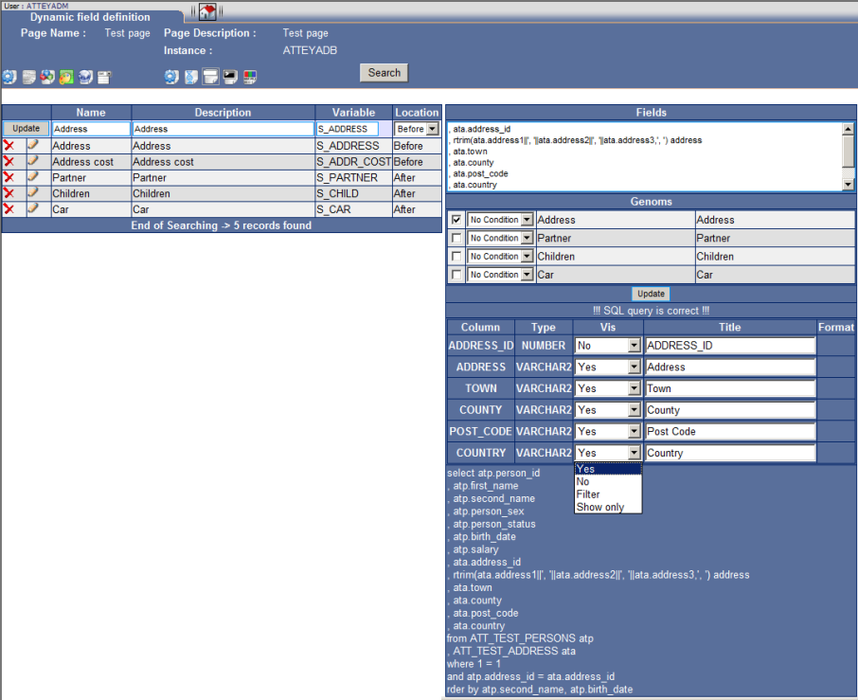
“Dynamic Field” function, here we will enter such name of the entry field into the “Name” field, which we want to be used in the form.
"Description" is not shown anywhere else and is for an administrator only.
It is necessary to define a variable, which will be used in the page. It is recommended to use uppercase and S and an underline if possible.
It is possible to specify whether columns will be displayed in front of columns of the basic SQL or after them in the “Location” column.
STEP 2
STEP 3

Dynamic Field - Definition
-
Last modified2012-02-24
-




