
![[img]](/site/images/menu/menu_products_services.png)
![[img]](/site/images/menu/menu_solutions.png)
![[img]](/site/images/menu/menu_support.png)
![[img]](/site/images/menu/lock_users.png)
![[img]](/site/images/menu/set_logo_149x61.png)
![[img]](/site/images/menu/menu_partners.png)
![[img]](/site/images/menu/mezera.png)
![[img]](/site/images/menu/line_vertical.png)
![[img]](/site/images/menu/lock_partners.png)
![[img]](/site/images/menu/menu_about.png)

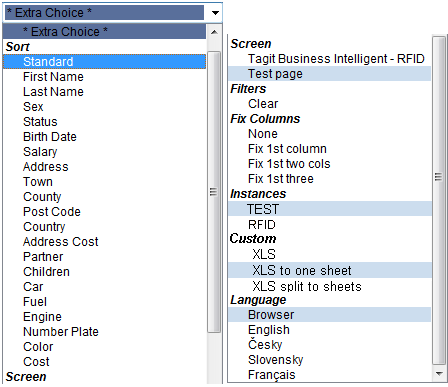
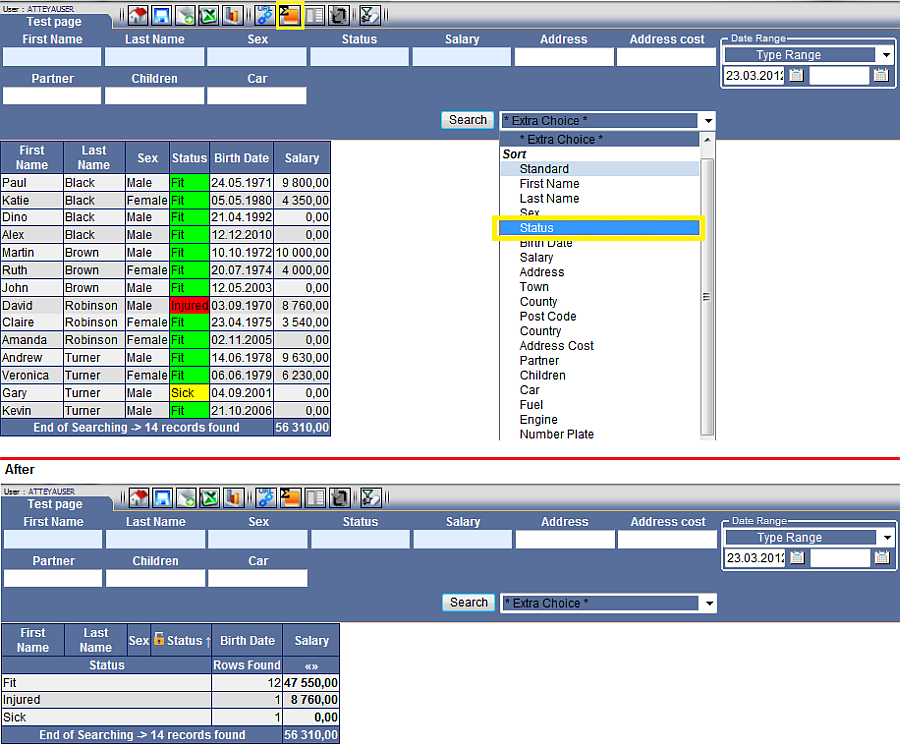 Example
Fig. No. 1
- Set summarization "2st level Advanced"on the functions tab.
- In "Extra Choice" set sorting "Sort" on one of the the active fields in the form.
- Activate by the "Search" button.
Options
- "Sort" - Change data sorting in the column.
- "Screen" - Change the module with an option to transfer some of the parameters.
- "Filters" - Some modules contain pre-configured filters, which are also displayed on the functions tab by an icon. These filters may be activated via "Extra Choice". The pre-configured filters are by default defined in ApplStream.
- "Instances" - Switch to another database instance.
- "Custom" - Selecting the data export type to Excel with the option of one or several sheets.
- "Language" - Change application localization.



