
![[img]](/site/images/menu/menu_products_services.png)
![[img]](/site/images/menu/menu_solutions.png)
![[img]](/site/images/menu/menu_support.png)
![[img]](/site/images/menu/lock_users.png)
![[img]](/site/images/menu/set_logo_149x61.png)
![[img]](/site/images/menu/menu_partners.png)
![[img]](/site/images/menu/mezera.png)
![[img]](/site/images/menu/line_vertical.png)
![[img]](/site/images/menu/lock_partners.png)
![[img]](/site/images/menu/menu_about.png)
For the definition of a new dynamic genome it is necessary to enter a “Denomination” and a “Description”.
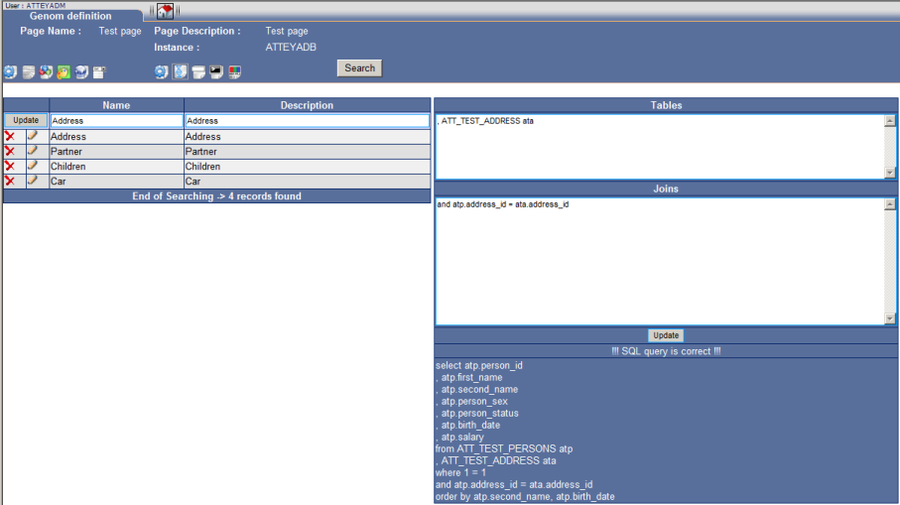
The genome is transferred to the correction mode upon clicking the “Enter” key. It is possible to enter tables and links here, see fig. No. 5.
The key “Correct” enters new features.
SQL Intelligent assigns newly defined features to the original SQL query and executes a check whether it is in order. In our case the check was performed without a problem, see fig. No. 6. It is necessary to adhere to bracket conventions when creating embedded selects. It can happen that the query is not correct in the case of higher number of mutually linked genomes. In such case it would not be a critical problem.
In our example we add a table of Inventories and values of quantities inventories. Further we define the first and the last transaction per an item.
By this we have prepared new features, which can be used in the “Dynamic Field Definition” function.

SQL function DNA - Definition
-
Last modified2012-02-24
-




